
반응형
Notice
Recent Posts
Recent Comments
Link
| 일 | 월 | 화 | 수 | 목 | 금 | 토 |
|---|---|---|---|---|---|---|
| 1 | 2 | 3 | 4 | 5 | 6 | 7 |
| 8 | 9 | 10 | 11 | 12 | 13 | 14 |
| 15 | 16 | 17 | 18 | 19 | 20 | 21 |
| 22 | 23 | 24 | 25 | 26 | 27 | 28 |
| 29 | 30 | 31 |
Tags
- leetcode
- state
- route
- c++
- node.js
- routes
- count
- axios
- Props
- event
- React
- MySQL
- JSX
- Callback
- DP
- nodeJS
- bit
- queue
- treenode
- map
- Context
- Navigation
- component
- UE5
- 비트연산
- BinaryTree
- array
- priority_queue
- css
- server
Archives
- Today
- Total
우사미 코딩
[Node.js] server.js 생성하고 서버 구동하기 본문
반응형
https://www.youtube.com/watch?v=YO9CqrnxbFU&list=PLRx0vPvlEmdD1pSqKZiTihy5rplxecNpz&index=7
나동빈 쓰앵님의 강의 관련
1. 내 app의 모든 코드를 root/client 생성해서 옮긴다
2. gitignore파일은 root에 다시 복사해준다
3. server.js를 생성한다
const express = require('express');
const bodyParser = require('body-parser');
const app = express();
const port = process.env.PORT || 3001;

app.use(bodyParser.json());
app.use(bodyParser.urlencoded({extended:true}));

app.get('/', (req, res)=>{
    res.send({message : 'Hello Express!'});
});

app.listen(port, ()=>{
    console.log(`Listen on port ${port} hehehe`);
})
4. package.json을 생성한다
{
    "name": "management",
    "version": "1.0.0",
    "scripts": {
      "client": "cd client && npm start",
      "server": "nodemon server.js",
      "dev": "concurrently --kill-others-on-fail \"npm run server\" \"npm run client\""
    },
    "dependencies": {
      "body-parser": "^1.19.0",
      "express": "^4.17.1",
      "nodemon": "^3.0.1"
    },
    "devDependencies": {
      "concurrently": "8.2.1"
    }
  }
5. 터미널에 명령어 입력한다
npm install nodemon body-parser express
6. 터미널에서 서버를 실행한다
npm run server // 서버 실행 (scripts에 정의한 key로..)

npm run dev 하면 "concurrently --kill-others-on-fail \"npm run server\" \"npm run client\""에 의해
서버와 클라이언트 동시 실행됨
위에서 설정한 port로 접속한다
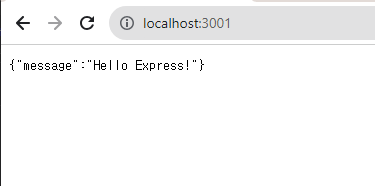
app.get('/')일 때 {message : 'Hello Express!'}가 뜨고
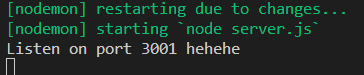
터미널 콘솔에서는 Listen on port 3001 hehehe가 뜨면 된다.
끝
반응형
'Node.js' 카테고리의 다른 글
| [Node.js] express로 GET, POST, ROUTE 요청 처리하기 (0) | 2023.09.20 |
|---|---|
| [Node.js] nodemon 설치 - (0) | 2023.09.20 |
| [Node.js] Request 처리하기 (0) | 2023.09.20 |
| [Node.js] Express에서 REST API 구축하기 (ft. 동빈나쓰앵님) (0) | 2023.09.18 |
'Node.js' Related Articles
more


Comments