
반응형
Notice
Recent Posts
Recent Comments
Link
| 일 | 월 | 화 | 수 | 목 | 금 | 토 |
|---|---|---|---|---|---|---|
| 1 | 2 | 3 | 4 | 5 | 6 | 7 |
| 8 | 9 | 10 | 11 | 12 | 13 | 14 |
| 15 | 16 | 17 | 18 | 19 | 20 | 21 |
| 22 | 23 | 24 | 25 | 26 | 27 | 28 |
| 29 | 30 | 31 |
Tags
- MySQL
- axios
- Navigation
- bit
- state
- server
- c++
- route
- DP
- JSX
- treenode
- map
- React
- css
- Callback
- BinaryTree
- 비트연산
- component
- event
- UE5
- array
- routes
- priority_queue
- Props
- leetcode
- Context
- node.js
- nodeJS
- queue
- count
Archives
- Today
- Total
우사미 코딩
[React] 관리자모드에서 component 확인하기 (ft. 크롬 확장 프로그램) 본문
반응형
1. 크롬에서 React Developer Tools 확장프로그램을 설치한다
React Developer Tools
Adds React debugging tools to the Chrome Developer Tools. Created from revision 2468a8735 on 5/19/2023.
chrome.google.com
2. 열어두었던 페이지를 새로고침하고 관리자 도구를 켠다
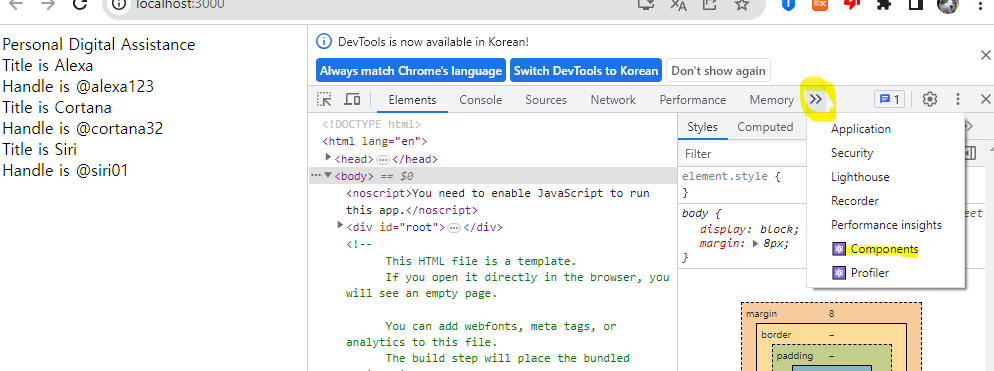
화살표누르고 components 클릭한다
3. 현재 페이지의 components와 props를 확인할 수 있다
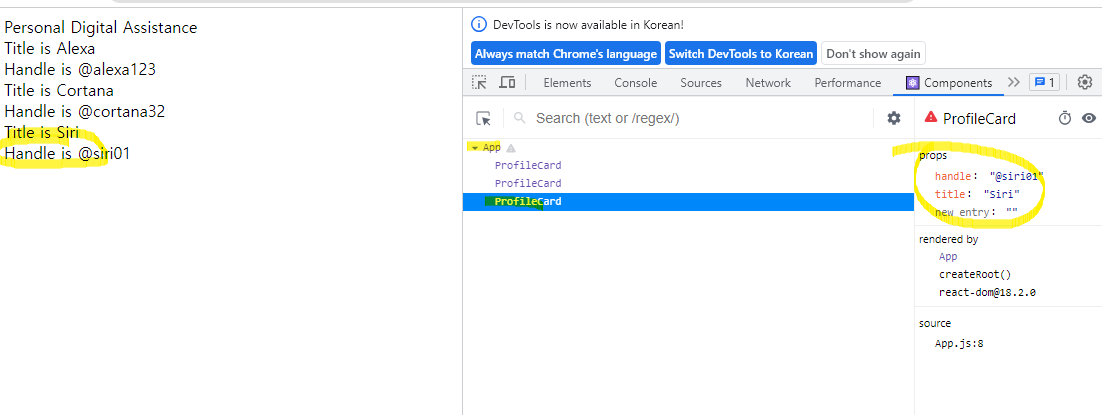
끝
반응형
'React' 카테고리의 다른 글
| [React] React 프로젝트에서 스타일 적용하기 (ft. bulma) (0) | 2023.06.22 |
|---|---|
| [React] 프로젝트에 이미지 추가하고 불러오기 (0) | 2023.06.22 |
| [React] props 사용하기 (0) | 2023.06.22 |
| [React] jsx의 경로와 import, export (0) | 2023.06.22 |
| [React] Jsx - converting HTML to JSX (0) | 2023.06.21 |
'React' Related Articles
more


Comments