
반응형
Notice
Recent Posts
Recent Comments
Link
| 일 | 월 | 화 | 수 | 목 | 금 | 토 |
|---|---|---|---|---|---|---|
| 1 | 2 | 3 | 4 | 5 | 6 | 7 |
| 8 | 9 | 10 | 11 | 12 | 13 | 14 |
| 15 | 16 | 17 | 18 | 19 | 20 | 21 |
| 22 | 23 | 24 | 25 | 26 | 27 | 28 |
| 29 | 30 | 31 |
Tags
- queue
- UE5
- component
- map
- count
- Callback
- BinaryTree
- DP
- Props
- route
- array
- treenode
- bit
- c++
- event
- server
- node.js
- JSX
- routes
- Navigation
- 비트연산
- nodeJS
- axios
- css
- state
- priority_queue
- Context
- leetcode
- React
- MySQL
Archives
- Today
- Total
우사미 코딩
[React] 프로젝트에 이미지 추가하고 불러오기 본문
반응형
1. src폴더안에 images 폴더 생성 후 이미지파일 넣는다
2. 이미지를 import한다 (App.js)
    import ProfileCard from "./ProfileCard";
    import AlexaImage from "./images/alexa.png";
    import CortanaImage from "./images/cortana.png";
    import SiriImage from "./images/siri.png";

    console.log(AlexaImage);
    console.log(SiriImage);
    function App(){
        return(
            <div>
                <div>Personal Digital Assistance</div>
                <ProfileCard title = "Alexa" handle="@alexa123" image={AlexaImage}/>
                <ProfileCard title = "Cortana" handle="@cortana32" image={CortanaImage}/>
                <ProfileCard title = "Siri" handle="@siri01" image={SiriImage}/>
            </div>
        );
    }

    export default App;
이미지는 컴포넌트처럼 변수로 선언하여 사용할 수 있다.
import 한 후 컴포넌트의 props로 넘겨준다
console.log로 찍으면 용량이 작은건 base64형식으로 출력되고
용량이 크면 서버에서 처리되는 경로를 출력한다

이런식으로 말이져
3. ProfileCard.js
    function ProfileCard({title, handle, image}){
        return (
            <div>
                <img src={image}/>
                <div>Title is {title}</div>
                <div>Handle is {handle}</div>
            </div>
        );
    }
    export default ProfileCard;
부모컴포넌트에서 props로 넘겨진 image를 출력하기 위해서 인자를 수정했고 img태그를 추가했다.
브라우저에서 개발자 도구를 켜도 아무런 에러가 없지만
터미널을 보면
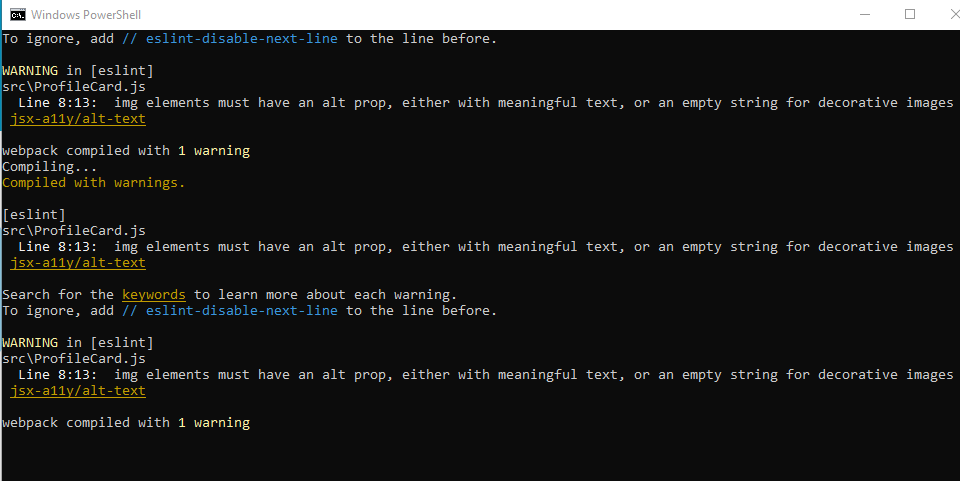
warning 파티 ^^
읽어보니 img태그에 alt 속성을 추가해달라고 한다.
어렵지 않은 요청이니 alt="pda logo"이런식으로 추가해준다.
끝
반응형
'React' 카테고리의 다른 글
| [React] 이벤트 처리하기 - 콜백함수 정의 (0) | 2023.06.23 |
|---|---|
| [React] React 프로젝트에서 스타일 적용하기 (ft. bulma) (0) | 2023.06.22 |
| [React] 관리자모드에서 component 확인하기 (ft. 크롬 확장 프로그램) (0) | 2023.06.22 |
| [React] props 사용하기 (0) | 2023.06.22 |
| [React] jsx의 경로와 import, export (0) | 2023.06.22 |
'React' Related Articles
more


Comments